Chapter 24 Power analysis by simulation
This chapter will first focus on how we can answer questions like “what sample size should I use in my experiment?” and “with this sample size, what difference could I detect?”
As you learned in the chapters on t-tests and ANOVA, the detection of a significant difference between treatment groups (if there is one) depends on two things: (1) the actual difference between mean values for the groups (the “signal”) and (2) the amount of variation there is in the groups (the “noise”). When there is a lot of noise it is hard to detect the signal.
In most cases we will already have some idea about what to expect when doing a study. Previous work on similar topics, or pilot studies, will have given us an idea of typical values for the response variable, and will give us a ballpark estimate of how much variation to expect. This information can be used to conduct a power analysis by simulation.
The basic idea of this approach is to simulate the experiment by drawing random numbers from appropriate distributions before actually carrying it out.
24.1 Type I and II errors and statistical power
Before setting out to run an experiment or an observational study it is natural to wonder “how much work do I really need to do here?” In other words, “what sample size do I need in order to address the hypothesis?”
Similar questions are also relevant after running an experiment. For example, imagine you have run an experiment that failed to find a significant effect of your treatment. There are two explanations for this finding: (i) there really is no effect of your treatment; (ii) there is an effect of your treatment but you did not have enough power to detect it. So the question arises: “what difference could you have detected, based on the results you have?” The answer could be “Based on my experiment I can see that if there is really a difference it must be smaller than \(X\)” and/or “I would need to increase my sample size to X to detect a difference if the difference is \(Y\)”.
Avoid “observed power”. It can be tempting, after a non-significant result, to calculate the power of your study using the effect size you actually observed. This “observed” (or “post hoc”) power tells you nothing new: it is simply a re-expression of your p-value (a non-significant result always has low observed power). The useful questions are the ones above: what effect size could the study have detected, or what sample size would be needed to detect an effect of a size that matters biologically? The confidence interval for the difference is also very helpful here, because it shows the range of effect sizes that are compatible with your data.
Choosing the effect size. Use pilot data to estimate the variation (the standard deviation). For the effect size, use the smallest difference that would matter biologically, decided before you see the results. A pilot’s observed difference is a noisy estimate from a small sample. Pilots that look promising tend to overestimate the effect, so planning around them often gives a study with less power than intended.
These types of questions are closely related to the two types of error that one can make when testing hypotheses:
- A Type I error is the rejection of a true null hypothesis. For example, when there truly is no effect of an experimental treatment, but you detect one in error.
- A Type II error is the failure to reject a false null hypothesis. For example, when there truly is an effect of an experimental treatment, but you fail to detect it.28
The probability of making a Type I error is set by the significance criterion (\(\alpha\)) that you choose: if you use \(\alpha = 0.05\), then when the null hypothesis is true you will wrongly reject it 5% of the time. The probability of making a Type II error depends on the statistical power of your study. Statistical power ranges between 0 and 1 and, for a simple hypothesis test, it is defined as the probability that the test rejects the null hypothesis (\(H_0\)) when the alternative hypothesis (\(H_1\)) is true. In other words it is the probability of NOT making a Type II error.
For example, a power of 0.80 means that you have an 80% chance of correctly detecting that \(H_1\) is true and a 20% chance (1.0 - 0.8 = 0.2) of making a Type II error. As power decreases, the probability of making a Type II error increases.
24.2 What determines statistical power?
Statistical power is determined by several factors including the actual effect size, the natural variation in the data, the sample size in the study, and the (arbitrary) criterion you have chosen for significance:
- The magnitude of the actual effect of interest. If the effect under investigation is very small then it will be harder to detect (i.e. the power to detect it will be small).
- Variation. Variation in the data introduces noise into the statistical test. Where there is large amounts of natural variation it is harder to detect significant effects (i.e. the power to detect it will be reduced).
- The sample size. Larger sample sizes reduce the amount of sampling error and therefore reduce the amount of “noise” in the data. Therefore large sample sizes increase power to detect a difference between groups.
- Measurement precision. Measurement error adds noise to the data, so power can also be increased by improving the precision of measurements.
- The significance criterion (\(\alpha\)). We normally use \(\alpha = 0.05\), but this is arbitrary. We could increase the power of the statistical test by using a more relaxed criterion, e.g. \(\alpha = 0.10\), but this comes at a cost: it also increases the probability of a Type I error.
There are several ways to estimate statistical power, required sample sizes etc. In this chapter we will look at one of them: power analysis by simulation. This is best communicated using a simple example.
24.3 An example of calculating statistical power
In an experiment, researchers would like to test a hypothesis that a high protein diet increases the size of adult insects from a pest species. Previous work has shown that the average size on a normal diet is 12 mm with a standard deviation of 3 mm.
In this chapter we use this package (and, as always, work inside your course RStudio project):
We can simulate a distribution of measurements from this distribution using the rnorm function. This draws n numbers from a theoretical normal distribution with a particular mean and standard deviation (sd). For example:
##  [1] 16.11288 10.30591 13.08939 13.89859 13.21280 11.68163 16.53457 11.71602
##  [9] 18.05527 11.81186
Because this is a random process your results will be different (and they will be different each time you run the code). If you want to get the same random numbers each time, for example to make your work reproducible, you can first set the random number “seed” with set.seed() (e.g. set.seed(42)).
Suppose that other studies on a different species have shown that a high protein diet leads to a 20% increase in size. This means that we expect our treatment group to have a body length of 12 \(\times\) 1.2 = 14.4 mm. If we assume the standard deviation will be the same, we can simulate a distribution for a high protein treatment group in the same way as for the control group:
##  [1] 18.16416 19.51226 17.04097 12.65537 13.89243 17.59434 16.55513 14.51473
##  [9] 11.25101 15.03694
Now we have two simulated samples, and we can conduct a t-test on those samples and store the result:
We can print this result to the screen like this:
##
##  Welch Two Sample t-test
##
## data:  control and treatment
## t = -1.7337, df = 17.976, p-value = 0.1001
## alternative hypothesis: true difference in means is not equal to 0
## 95 percent confidence interval:
##  -4.3793101  0.4196255
## sample estimates:
## mean of x mean of y
##  13.64189  15.62173
Or just get the p-value like this:
## [1] 0.100093624.3.1 The simulation
The idea with power analysis by simulation is to repeat this procedure many times (at least 1000) to estimate the probability that you get it right (that you detect a significant difference between groups when you know there is a difference29).
You have come across this sort of simulation approach before when we talked about randomisation tests. As before we will use the replicate function to repeatedly do t-tests on randomly generated data with the characteristics you select (i.e. sample size, mean, and standard deviation).
We first set up our simulation by defining the mean, standard deviation, and sample size of our simulated experiment.
Now we can “wrap” a t.test on simulated control and treatment data sets within a replicate function like this. Take some time to study this part of the script - it is important that you understand what it is doing. In this case the replicate command is telling R to repeat the t-test 5 times.
replicate(
  5,
  t.test(
    rnorm(sampleSize, controlMean, sdValue),
    rnorm(sampleSize, treatmentMean, sdValue)
  )$p.value
)
## [1] 0.0506748916 0.0004174904 0.0303818981 0.4768898365 0.0296402507Let’s repeat the t-test 1000 times so we can get a good idea of the number of times that the test correctly detects that there is a difference between the two groups.
I don’t want to print 1000 p-values to the screen so I will collect them in a vector called powerResults.
powerResults <- replicate(
  1000,
  t.test(
    rnorm(sampleSize, controlMean, sdValue),
    rnorm(sampleSize, treatmentMean, sdValue)
  )$p.value
)
I can now ask how many of the p-values stored in powerResults were less than 0.05.
## [1] 393So in this case, 393 of the 1000 tests detected the difference. The statistical power can be calculated by turning this into a percentage, i.e. Power = 39.3%.
A handy shortcut is to take the mean of the TRUE/FALSE values. R treats TRUE as 1 and FALSE as 0, so the mean is the proportion of tests that were significant, which is the power:
## [1] 0.393We can ask what sample size do we need to get a better power, e.g. 90%, by increasing sample size incrementally. For example, here I increase sample size to 15:
controlMean <- 12
treatmentMean <- 14.4
sdValue <- 3
sampleSize <- 15 # Increased

powerResults <- replicate(
  1000,
  t.test(
    rnorm(sampleSize, controlMean, sdValue),
    rnorm(sampleSize, treatmentMean, sdValue)
  )$p.value
)

(sum(powerResults < 0.05) / 1000) * 100
## [1] 54.9The power has increased to 54.9%.
24.4 Power for other models
The simulation approach is not limited to t-tests and normally distributed data. Because we are simply generating fake data and running the analysis many times, we can use any combination of data type and test: we just change the function that generates the data and the model we fit. Here are two more examples: one for a binomial GLM, and one for linear regression.
24.4.1 A binomial GLM
To illustrate, here is the same idea applied to binary (survival) data analysed with a binomial GLM, exactly the kind of model you met in the GLM chapters.
Imagine we are planning an experiment to test whether a treatment improves survival. Suppose that, without treatment, half of the individuals survive (a probability of 0.5), and we would like to be able to detect an increase to 0.7. Instead of drawing from a normal distribution with rnorm, we now generate 0/1 survival data with rbinom, fit a binomial GLM, and extract the p-value for the treatment effect:
controlProb <- 0.5 # survival probability without treatment
treatmentProb <- 0.7 # survival probability we hope to detect
sampleSize <- 40 # individuals per group

powerResults <- replicate(1000, {
  # Simulate 0/1 survival data for the two groups
  survival <- c(
    rbinom(sampleSize, size = 1, prob = controlProb),
    rbinom(sampleSize, size = 1, prob = treatmentProb)
  )
  treatment <- rep(c("control", "treatment"), each = sampleSize)

  # Fit a binomial GLM and get the p-value for the treatment effect
  mod <- glm(survival ~ treatment, family = binomial)
  anova(mod, test = "Chisq")[["Pr(>Chi)"]][2]
})

(sum(powerResults < 0.05) / 1000) * 100
## [1] 48.4At 40 individuals per group the power is about 48%, well short of the usual 80% target. Binary (0/1) outcomes carry less information than continuous measurements, so you typically need larger samples to detect a difference in proportions than a difference in means. Just as with the t-test example, you could now increase sampleSize until the power reaches your target. The important message is that the recipe stays the same whatever the data: simulate data, run the test, and count how often it is significant. Only the random-number function (rnorm, rbinom, rpois, …) and the choice of test need to change.
24.4.2 A linear regression
We can do exactly the same for a linear regression. Imagine we are planning a study to detect how a response (say, body size) changes with a continuous predictor (say, temperature). We expect a slope of about 2 units per degree, with a fair amount of scatter around the line (a residual standard deviation of 12), and we can afford to measure 30 individuals. As before, we simulate data that match these expectations, fit the model with lm, and extract the p-value for the slope:
slope <- 2 # change in y per unit x that we hope to detect
intercept <- 20
residualSD <- 12 # scatter around the line
sampleSize <- 30

# predictor values, sampled over a fairly narrow range
x <- seq(11, 19, length.out = sampleSize)

powerResults <- replicate(1000, {
  y <- intercept + slope * x + rnorm(sampleSize, 0, residualSD)
  mod <- lm(y ~ x)
  summary(mod)$coefficients["x", "Pr(>|t|)"]
})

(sum(powerResults < 0.05) / 1000) * 100
## [1] 54.1This gives a power of about 54%, so with this design we would miss a real effect a fair fraction of the time.
So far this is just the familiar recipe. But regression has an extra lever that the t-test does not, and it is easy to miss. The power to detect a slope also depends on how widely you spread your predictor values. Keeping the slope, the noise, and the sample size exactly the same, watch what happens if we sample x across a much wider range:
# EXACTLY the same study, but x spread over a much wider range
x <- seq(5, 25, length.out = sampleSize)

powerResults <- replicate(1000, {
  y <- intercept + slope * x + rnorm(sampleSize, 0, residualSD)
  mod <- lm(y ~ x)
  summary(mod)$coefficients["x", "Pr(>|t|)"]
})

(sum(powerResults < 0.05) / 1000) * 100
## [1] 99.9The power jumps to about 100%, even though the slope, the residual noise, and the sample size are unchanged. A slope is estimated more precisely when the predictor is spread out: the wider the range of x, the more leverage the data have to pin down the line.
This is a genuinely useful design principle. Whenever you have control over your predictor (experimental doses, incubation temperatures, sites along an environmental gradient), you will get more power for the same effort by spreading those values across a wide range rather than clustering them in the middle. (The caveat is that this assumes the relationship really is linear across that range; spreading x so far that the relationship starts to curve would create a different problem.)
24.5 Extending the simulation (optional, advanced)
This section is for illustration only. It is intended to show the
utility of using R to quickly address experimental design questions but
it goes beyond what you are expected to learn. I hope you find it
interesting nevertheless. It uses the base R function
sapply, which applies a function to each value in a vector
and collects the results.
One can extend the simulation to cover a range of sample sizes (or differences between treatments, or standard deviations etc.) by turning the calculations of the t-test into a function, and then applying that function over a range of values.
I illustrate this below by varying sample size between 5 and 40.
# Set up a data frame for the simulation results
simulData <- data.frame(sampleSize = 5:40)

# Set basic values
controlMean <- 12
treatmentMean <- 14.4
sdValue <- 3

# Function to do the t-test
pwr <- function(n) {
  sum(replicate(
    1000,
    t.test(
      rnorm(n, controlMean, sdValue),
      rnorm(n, treatmentMean, sdValue)
    )$p.value
  ) < 0.05) / 1000
}

# sapply applies the function to every value of
# simulData$sampleSize
simulData$Power <- sapply(simulData$sampleSize, pwr)
These results can then be graphed with ggplot.
# Plot the output
ggplot(simulData, aes(x = sampleSize, y = Power)) +
  geom_point() +
  geom_line() +
  geom_hline(yintercept = 0.8, linetype = "dashed")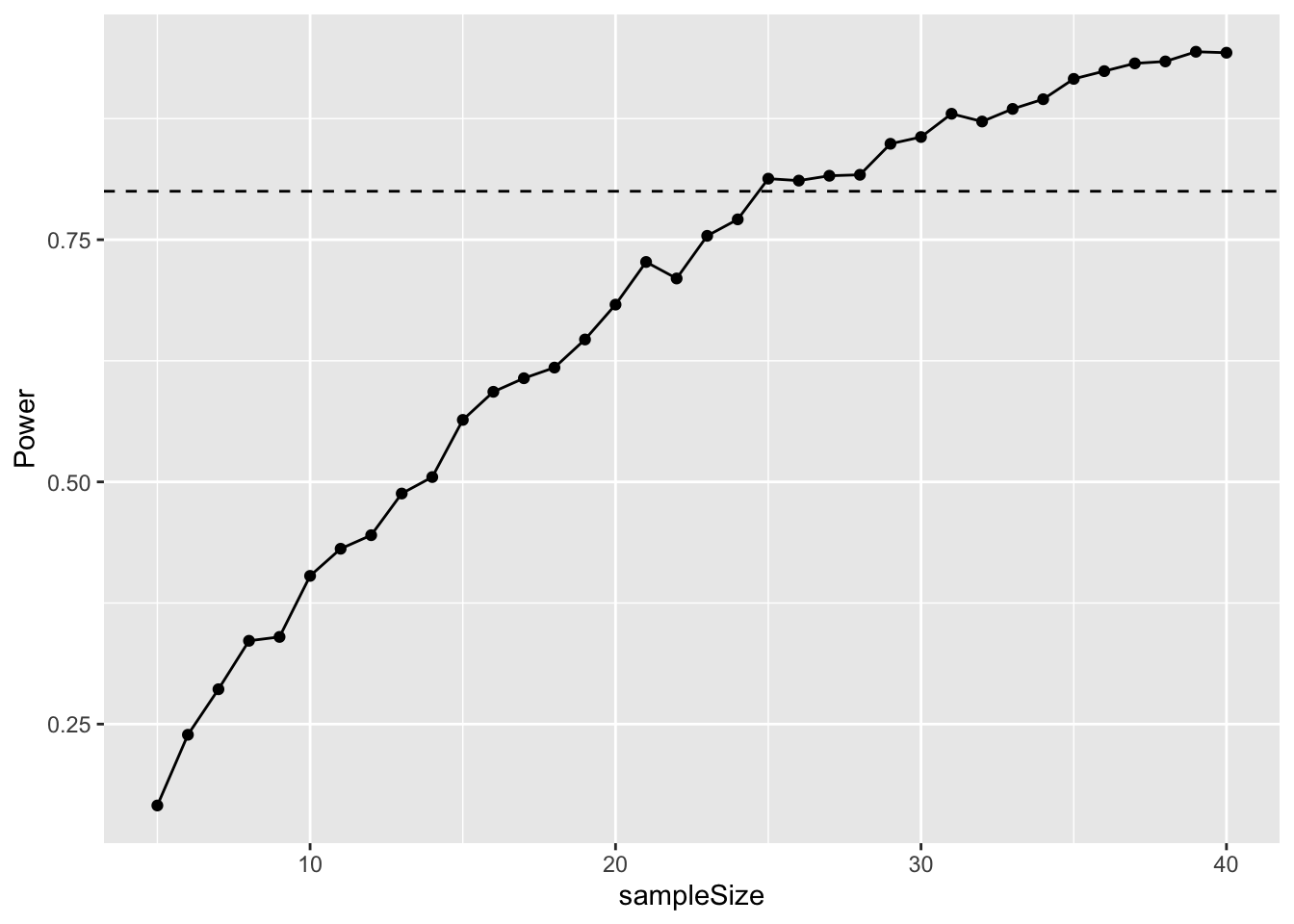
Try it: Power Simulation Lab (open the lab)
Estimate power by simulation.
- Before you look: if you halve the difference you want to detect, roughly how many more samples per group do you need for 80% power? Check it.
- Set the difference to 0. What “power” do you get, and why is it close to alpha?
24.6 Summary
Simulation is a powerful tool to help design studies and to understand their results. The recipe is always the same: (1) decide on the smallest effect that would matter biologically, and on realistic values for the variation, based on previous work or pilot data; (2) simulate data with those properties; (3) analyse the simulated data with the test or model you plan to use; and (4) repeat many times and count how often the result is significant. Only the random-number function (rnorm, rbinom, rpois, …) and the analysis (t.test, lm, glm, …) need to change. You can then vary the sample size (or the design, such as the spread of predictor values) until the power reaches your target, usually 80%.
24.7 Exercise 1: Snails on the move
Your supervisor has collected pilot study data on the distance travelled by a particular snail species during one day. In this study the mean distance travelled was 7.4m and there was a standard deviation of 2.76m. There are two colour morphs of the snails: One is bright and colourful with a striking black spiral while the other is drab and kinda boring-looking. Your supervisor focused on the colourful snails, but assume that standard deviation is the same for both morphs.
For your masters project you hypothesise that the boring snail will cover more distance because it is less scared of visual predators and willing to expose itself to more risk while foraging. You don’t have a good feel for the difference, but you decide that a 25% difference between the morphs would be biologically interesting.
Simulate a t-test-based analysis in R to figure out what sample size would result in 80% power.
24.8 Exercise 2: Mouse lemur strength
Previous work on grey mouse lemurs (Microcebus murinus) has found that they are quite strong. They can lift and hold 10 times their own body weight!30
This work was done on prime-age animals. Researchers believe that older individuals will have experienced physiological senescence and that their strength will have deteriorated. The body weight of these lemurs is about 60 g. The prime-age animals could lift and hold 600 g with a standard deviation of 145 g.
A research institute has agreed to you carrying out this study for your masters project. They have 25 prime-age lemurs, but only 8 old animals. You can assume the standard deviation is the same in both age classes.
What difference in strength could you reliably detect (with power >80%) with these sample sizes?31
To remember this, think of the story about “the boy who cried wolf”. First the villagers believe the boy when there was no wolf (Type I error). Second, the villagers don’t believe the boy but there IS a wolf (Type II error).↩︎
You know there is a difference because you have set this difference!↩︎
Thomas, P., Pouydebat, E., Brazidec, M., Aujard, F., & Herrel, A. (2015). Determinants of pull strength in captive grey mouse lemurs Journal of Zoology DOI: 10.1111/jzo.12292↩︎
A senescent decline in grip strength has since been demonstrated in grey mouse lemurs, both in captivity and in the wild: Hämäläinen, A., Dammhahn, M., Aujard, F., & Kraus, C. (2015). Losing grip: Senescent decline in physical strength in a small-bodied primate in captivity and in the wild. Experimental Gerontology, 61, 54-61.↩︎