23 Continuous-time Lotka-Volterra Predator-Prey Model in R
23.1 Background
The Lotka-Volterra model describes the interaction between predators and prey. This document demonstrates how to program the continuous-time version of the model in R. Then, by varying the parameters you can explore its features, and visualise the dynamics of predator and prey populations over time.
Learning outcomes:
- Use of R to investigate an ecological model.
- Understanding how the Lotka-Volterra predator-prey model works, and how it is visualised.
23.2 What you should see
With the default parameters, you should see:
- repeating oscillations in predator and prey abundances through time, with the predator peaks following the prey peaks
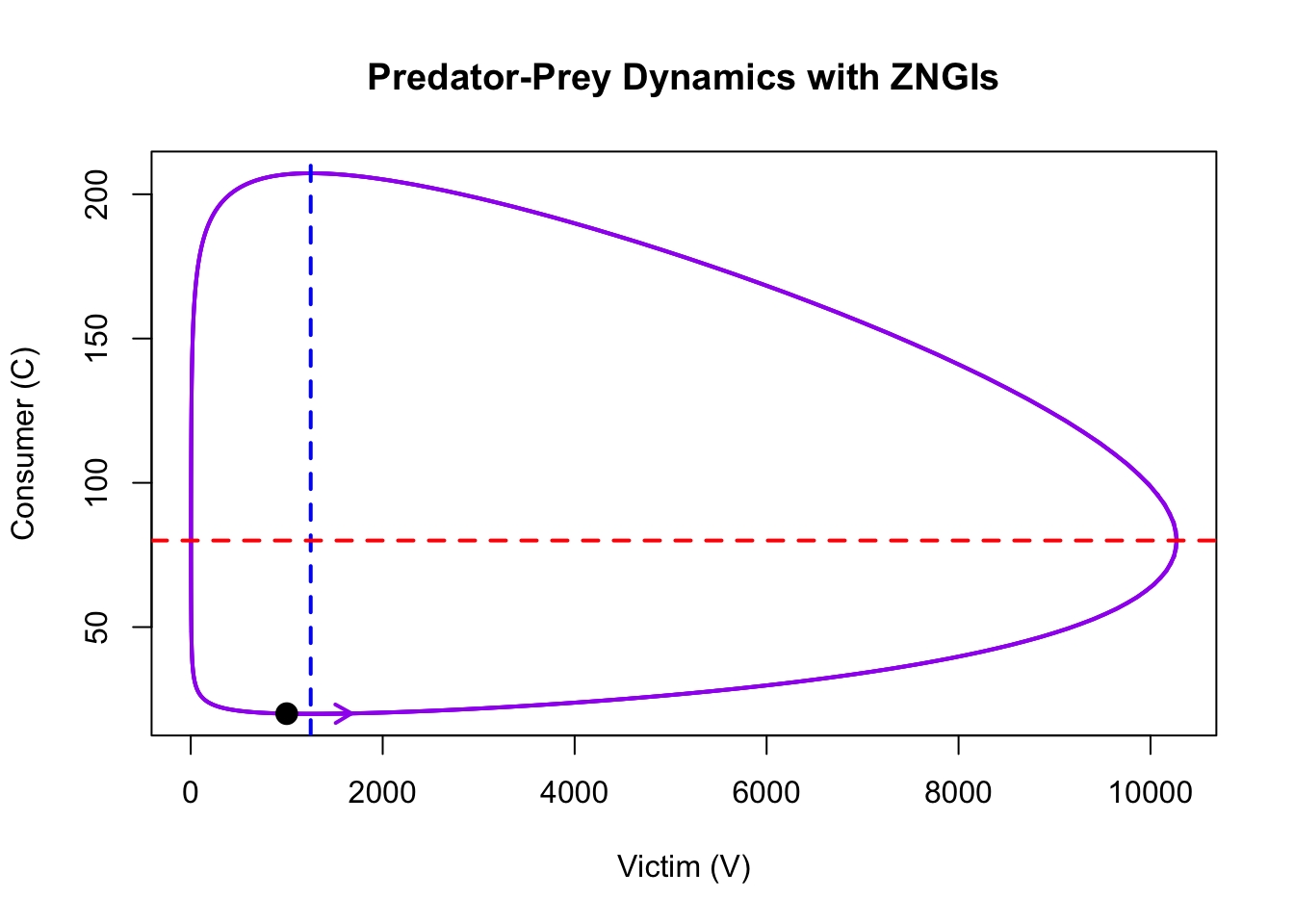
- a closed orbit in the phase plane around the coexistence equilibrium (the same loop is traced again and again)
- straight-line isoclines (ZNGIs) whose intersection is the coexistence equilibrium
This is the same model as the Excel spreadsheet and the discrete-time R chapter, with the same parameter values, but solved in continuous time. Comparing the three shows which behaviour belongs to the biology and which to the time steps.
23.3 Your task
In R/RStudio, you will create an R script that programs the continuous time version of the Lotka-Volterra model. You will then use this model to investigate how the model works and how varying the parameters affects the system.
23.3.1 Step 0: Create a new script
- Open RStudio and create a new script (File > New File > R Script).
- Save it with a useful name (File > Save).
- Type or copy/paste the following code, step-by-step, into the Script.
- Run the code, or parts of it, selecting the parts you want to run and clicking “Run”.
23.3.2 Step 1: Load Necessary Libraries
We will use the deSolve package to solve the system of differential equations numerically. Note that you may need to install the package first using the command install.packages("deSolve").
23.3.3 Step 2: Define the Model
The system of equations is defined as follows:
- Victim (prey) population growth: \(\frac{dV}{dt} = RV - aVC\)
- Consumer (predator) population growth: \(\frac{dC}{dt} = afVC - qC\)
The function below implements these equations in R.
23.3.4 Step 3: Set Parameters and Initial Conditions
We set the parameters and initial conditions for the model. I use the same nomenclature as the PDF from the Excel exercise, and the same values. The parameters are as follows: R is the victim population growth rate, a is the attack rate of the predator, f is the conversion efficiency of the predator and q is the predator starvation (death) rate. Here R is an instantaneous rate (Neal’s r), because the model is in continuous time.
The Neal textbook (chapter Predator-Prey Interactions) writes the same model as \(dH/dt = rH - aHP\) and \(dP/dt = cHP - dP\). The translation is: \(V = H\) (prey), \(C = P\) (predators), \(R = r\), \(a = a\), \(a \cdot f = c\) and \(q = d\).
23.3.5 Step 4: Simulate the Model
We simulate the model over a specified time period and store the results.
23.3.6 Step 5: Visualise the Dynamics
How does the size of the two populations change through time? You should see that the amplitude and period change as the parameters change.
- Amplitude: Half the difference between a population’s peak and trough. It shows how much the population fluctuates.
- Period: The time it takes for a population to complete one full cycle of oscillation. i.e. the peak-to-peak distance. It indicates the speed of the population cycles.
23.3.6.1 Population Dynamics Over Time
The plot below shows the changes in consumer and victim populations over time.
# Make room in the right-hand margin for the second axis label
par(mar = c(5, 4, 4, 5))

# Plot victim population on the primary y-axis
plot(output_df$time, output_df$V, type = "l", col = "blue", lwd = 2,
     ylab = "Victim Population (V)", xlab = "Time", main = "Predator-Prey Dynamics")

# Add consumer population on a secondary y-axis
par(new = TRUE)
plot(output_df$time, output_df$C, type = "l", col = "red", lwd = 2,
     axes = FALSE, xlab = "", ylab = "")
axis(side = 4, col = "red", col.axis = "red")
mtext("Consumer Population (C)", side = 4, line = 3, col = "red")

# Add legend
legend("topright", legend = c("Victim (V)", "Consumer (C)"),
       col = c("blue", "red"), lwd = 2)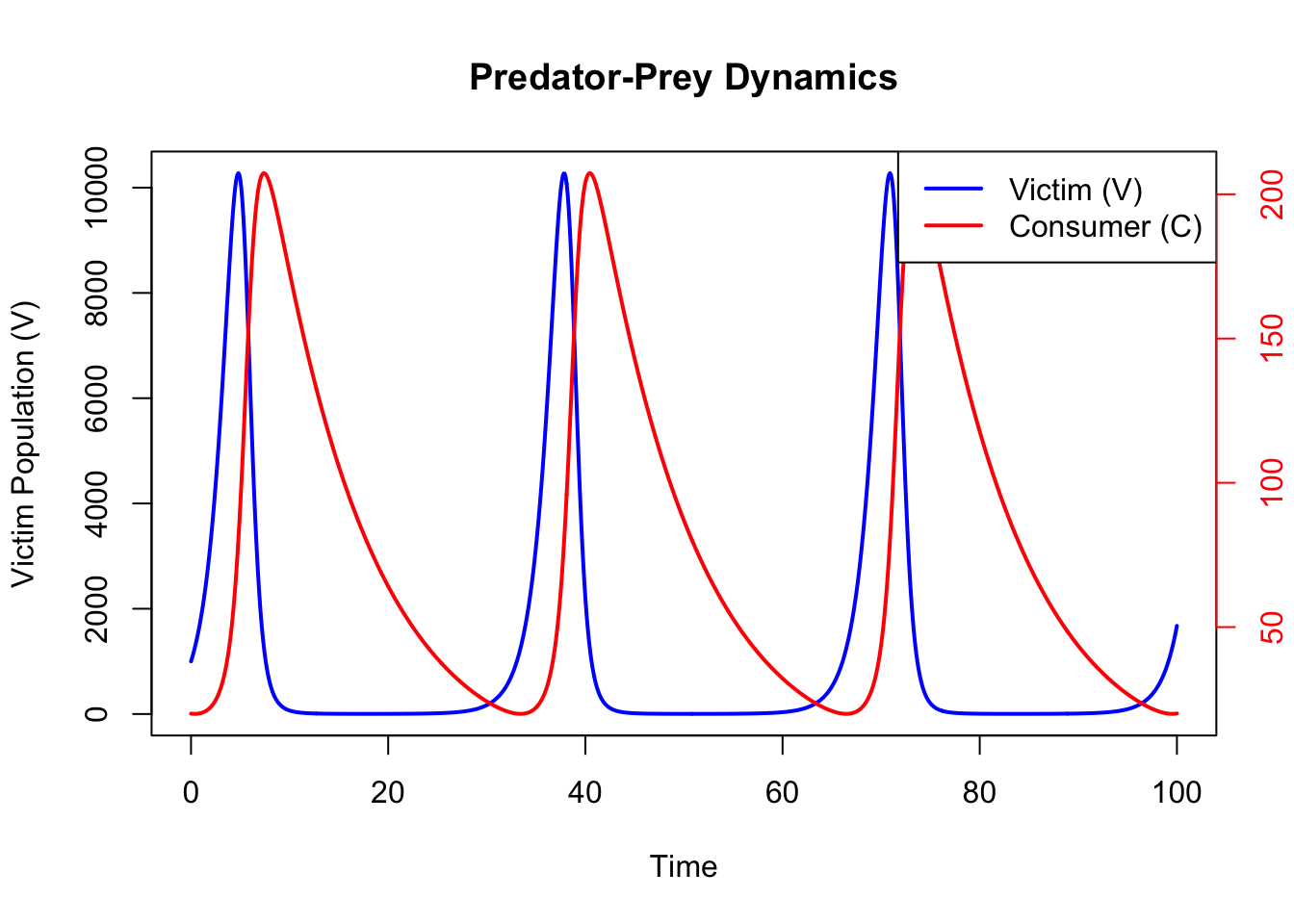
23.3.6.2 Phase Plot with ZNGIs
The phase plot shows the relationship between victim and consumer populations. Zero Net Growth Isoclines (ZNGIs) indicate where the growth rate of each population is zero.
plot(output_df$V, output_df$C, type = "l", col = "purple", lwd = 2,
     xlab = "Victim (V)", ylab = "Consumer (C)",
     main = "Predator-Prey Dynamics with ZNGIs")

# Consumer ZNGI: dC/dt = 0 when V = q / (a * f) (a vertical line)
abline(v = parameters["q"] / (parameters["a"] * parameters["f"]), col = "red",
       lwd = 2, lty = 2)
# Victim ZNGI: dV/dt = 0 when C = R / a (a horizontal line)
abline(h = parameters["R"] / parameters["a"], col = "blue", lwd = 2, lty = 2)

# Add point for initial population sizes
points(output_df$V[1], output_df$C[1], pch = 19, col = "black", cex = 1.5)

# Add a direction arrow only if the final step has visible movement.
n <- nrow(output_df)
step_inches <- c(
  diff(grconvertX(output_df$V[c(n - 1, n)], from = "user", to = "inches")),
  diff(grconvertY(output_df$C[c(n - 1, n)], from = "user", to = "inches"))
)
if (all(is.finite(step_inches)) && sqrt(sum(step_inches^2)) > 1e-3) {
  arrows(x0 = output_df$V[n - 1], y0 = output_df$C[n - 1],
         x1 = output_df$V[n], y1 = output_df$C[n],
         col = "purple", length = 0.1, lwd = 2)
}
23.3.7 Questions
Before you change anything, write down a prediction for each question (a sentence or a quick sketch), then run the code to check it.
1. Oscillations
- Run the simulation with the default parameters. Describe how the two populations change through time. Which peaks first, prey or predators, and why?
- In the phase plot, which way does the orbit go round (clockwise or anticlockwise)? Explain the direction using the four regions marked out by the isoclines.
2. Neutral stability and starting numbers
- Predict: what will happen if you start exactly at the equilibrium, \(V = 1250\), \(C = 25\)? And just next to it, at \(V = 1300\), \(C = 25\)?
- Now try starting values further away, e.g. \(V = 2000, C = 20\) and \(V = 1000, C = 40\). What happens to the amplitude and the period? Do the oscillations grow, shrink or stay the same over time?
3. Equilibrium and time-averages
- Calculate the equilibrium for the default parameters, using \[ V^* = \frac{q}{a \cdot f}, \quad C^* = \frac{R}{a}. \]
- The populations never settle at these values. Instead, compare them with the average population sizes over the simulation:
mean(output_df$V)andmean(output_df$C). What do you find?
4. Moving the isoclines
- Predict which isocline (prey or predator) moves, and in which direction, if you double each of \(R\), \(a\), \(f\) and \(q\) in turn. Check your predictions on the phase plot.
- A pesticide kills both prey and predators: it lowers \(R\) and raises \(q\). Try \(R = 0.2\) and \(q = 0.12\). What happens to the average numbers of prey and predators? Is this what you would have guessed? (This is Volterra’s principle; see Neal’s Predator-Prey Interactions.)
5. Extinction and reality
- Start far from the equilibrium, at \(V = 1000\), \(C = 100\). What are the smallest prey and predator numbers reached? Can either population reach exactly zero in this model? What would happen to a real population at these numbers?
- Which assumptions of the model are unrealistic? Which real-world factors might stop the cycles continuing for ever?
23.3.8 Conclusion
This document demonstrates how to implement and explore the Lotka-Volterra predator-prey model in continuous time using R. By varying parameters and initial conditions, you can investigate how predator-prey dynamics are influenced by ecological factors. Notice that, unlike the discrete-time model (which has an implicit time lag of one time step and gives oscillations of increasing amplitude that end in extinction), the continuous-time model gives neutrally stable cycles: they neither grow nor shrink, and their size depends on the starting populations. To see the discrete-time version, take a look at the Excel exercise (here) or the R exercise here.
The main findings of the continuous time model are as follows:
Oscillatory Dynamics: Predator and prey populations exhibit cyclical oscillations. The prey population increases when predator numbers are low, while the predator population grows when prey is abundant, so predator peaks follow prey peaks.
Neutral Stability: The oscillations are neutrally stable. They persist indefinitely without damping or amplification, and each pair of starting numbers gives its own orbit: the further from equilibrium you start, the larger the cycles. In the model neither population can ever reach exactly zero, but large orbits can take a population down to a fraction of one individual (for example, starting at \(V = 1000\), \(C = 100\) the predators fall to about 2 and the prey to about 8; with \(q = 1\) the predators fall to about 0.01). In a real population that would mean extinction.
Equilibrium Points: There are two equilibria:
- The trivial equilibrium, where both predator and prey populations are zero.
- The coexistence equilibrium, \(V^* = q/(af)\) and \(C^* = R/a\). The populations cycle around it rather than settling at it, but the average population sizes over a cycle equal the equilibrium values.
Parameter Dependence: The parameters set the position of the isoclines, and so the equilibrium: \(R\) and \(a\) move the prey isocline, \(q\), \(a\) and \(f\) move the predator isocline. The amplitude of the cycles is set by how far the starting numbers are from the equilibrium. For small cycles the period is approximately \(2\pi/\sqrt{Rq}\) (about 40 time units with the default parameters); large cycles take longer.
Phase Plane Behaviour: Predator and prey populations follow closed orbits in the phase plane around the coexistence equilibrium, anticlockwise when prey are on the x-axis, under the assumption that the system remains undisturbed.
23.4 Takeaways
- Continuous-time predator-prey models generate sustained, neutrally stable cycles: their size is set by the starting numbers, not by the parameters alone.
- Equilibria and isoclines help explain why cycles form and how parameters shift them; the average population sizes over a cycle equal the equilibrium.
- Real ecosystems add damping, delays, and noise that change these dynamics.